Welcome to AI5TS.com!
JS8 Meshtastic BridgeWhat is it?
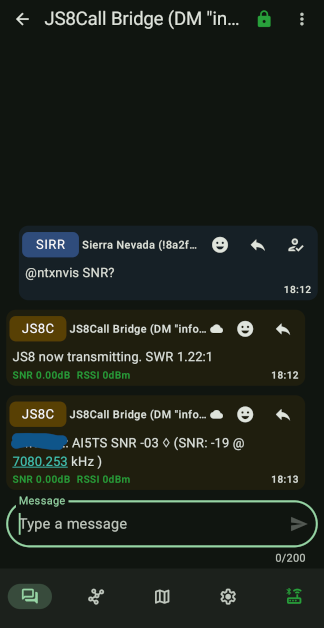
It allows you to connect a node to your computer, and create a two way bridge to from a personal meshtastic device to JS8Call. If you've ever wanted JS8 call on your cell phone, this is a simple way to do it. Would work great for a headless JS8 rig in your vehicle.
Does it require internet
No, the bridge is over RF using a personal meshtastic device, typically paired with a phone. Your computer and phone both do not require internet
Can I bridge it over the internet?
Yes, by adding MQTT to both the computer and personal Meshtastic devices, this bridge will work over the internet
Is it secure?
As secure as the encryption used for Meshtastic direct messages.
How is it useful?
You can send and receive JS8 call messages from outside your hamshack, or wherever you can reach your mesh
Can other people use it?
If non-admin nodes interact with the program, they can subscribe or unsubscribe to one callsign or net which will be forwarded via DM to their node; In addition to the three nets you mandatorily subscribe them to
How do I control it
After configuration, you just sent a Direct Message to the computer connected Meshtastic node
What commands does the bridge support
Help/Info, Freq (current frequency), LH (last heard for any station or net), subscribe, unsubscribe and the following for the Admin: CMDS (helpful list of js8 commands), SWR (get current SWR of QMX/Kenwood style radio TXing), 20m/40m/60m1/60m2/80m/etc for frequency switching, and any non matching command in the format of "callsign message" will TX in JS8Call
How will I know I'm not stepping on other stations in JS8Call?
The software has an offset hopper, that will move your JS8 offset immediately, after every frame, if other JS8 traffic is heard at that same offset (or there is any overlap, taking different speed bandwidths into account). It won't move to any position that has had activity for the last 10 minutes; If a free spot isn't found, it keeps decreasing that search by 15 seconds until it finds a location.
This sounds like something I'm not interested in, can I just use the automatic "busy slot" offset jumper for JS8 call?
Funny you'd ask! Just run python js8tastic.py --freq_hop_only --hopper_secs 600
Is it legal?
I believe it falls under remote operation, we will implement more features in the future to ensure legal operation in worst case scenarios
What do I need to make it work?
You just need a personal Meshtastic device, one extra Meshtastic device to connect to your computer, and JS8Call. Actually a transceiver is optional, because you could connect a SDR to JS8Call for RX abilities only
What else should I know
Its under active development as of the month of Jan in 2026th year of our lord. QMX radios are supported (or any other kenwood style CAT control) for cool features like sending you your antenna SWR when TXing
How do I make it work?
1 Download the python script (below)
2 Install python (set environmental variables during install)
3 Install Meshtastic CLI
4 Download the python script below
5 Run python js8tastic.py --help
6 You must set your callsign, nets, your PERSONAL meshtastic id, COM port to meshtastic device, at least to start. It's easiest to just open the python script and change the variables in the header
Start with something like: python js8tastic.py --mesh_serial COM10 --callsign KA1AAA --mesh_id 9876543210 --backup_id 1234567890 --code_word secretpass
7 Send a DM "info" to mesh node connected to computer. To transmit send "callsign message"
Download JS8 Meshtastic bridge (Release 1-12-26)
------------------------------------------------------------
JS8 <--> Meshtastic Bridge (C) AI5TS (Release 1-22-2026)
------------------------------------------------------------
js8tastic.py arguments
--help              This screen, help
--freq_hop_only     Stand-alone JS8 Auto Offset Hopping. If you don't want to use any of this except for the JS8 busy slot offset hopper
--hopper_secs       Consider JS8 offset free after X seconds
--disable_freq_hop  This completely disable the frequency/offset hopping function (except heartbeats)
--callsign          What is JS8 operator's callsign
--mesh_id           The 10 digit number of admin PERSONAL device, NOT the computer connected node
--backup_id         Backup admin 10 digit #, can be switched with code_word
--mesh_serial       COM port of computer connected meshtastic node
--mesh_tcp          This setting overrides COM port, and will connect to mesh device over TCP
--qmx_control       1 to enable CAT control, 0 to disable it
--qmx_serial        2nd COM port of QMX
--code_word         Used for changing admin, backup or principle admin may send to swap at any time
--admin_grid        Used for quick command "hb" to send correct grid
--net_#             1,2,3 Other than your callsign, what other traffic would you like?
--sub_net_#         1,2,3 Other than their subscription, what other traffic would you like to forward to them?
--disable_nonadmin  This completely disable the ability for any station interrogation by non-admin/backup.  WARNING: This doesn't disable the subscription system, and only admin/backup will be able to subscribe/unsubscribe!  MAKE SURE TO USE UNIQUE/NEW --sub_file when enabling
--js8_host          JS8 API hostname, default 127.0.0.1
--js8_port          JS8 API port, default 2442
--sub_file          Where to store subscriber's list
--lh_log            Where to store last heard log
--lh_secs           How many seconds to purge entry from last heard log (60*60*24*15 style permitted)
--contact_log       Where to store the incoming meshtastic message log
Change log:
1-22-2026: Added ability to modify status? for js8 call, also grabs grid/callsign from js8call, options still present but don't really serve a purpose now, will remove next update
1-16-2026: Bug fixes, last heard log cleanup option
1-15-2026: Sending message to @hb moves to 600-1000hz (- speed bandwidth) and then jumps back to random position, added --disable_freq_hop and --diable_nonadmin options, added admin command "hb" and --admin_grid option for that command (make sure to set it), added status command, added speed command for changing and querying JS8 speeds, added last js8call activity for status, station uptime, fixed some misc bugs, bit of cleanup
1-12-2026: Added ability to connect to meshtastic node via TCP, cleaned up some code, fixed fallthrough on frequency changer
Send me an email to karlanmitchell -at- gmail -dot- com